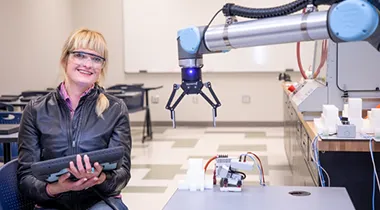
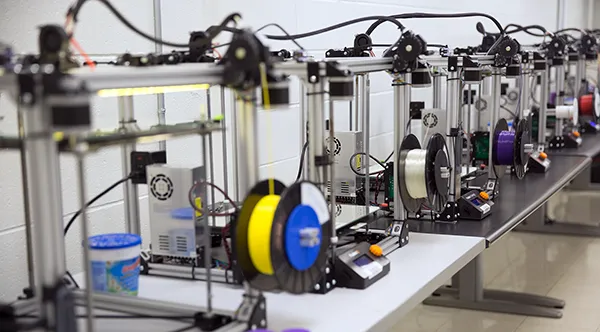
Learn how to program and operate robotic equipment in a manufacturing facility, or gain skills such as 3D printing, machining and more.


Engineering Career Field Courses
FAA Part 107: Commercial Drone (UAS) Pilot Exam Training
- Course ID: SEF-3001GD2
- Overview
- Course Outline
- Requirements
- Intended Audience
- More Details
Course Objectives
Students will understand drone safety and preflight basics, as well as aircraft systems, flight Operations, National Airspace Systems, weather and how laws apply to commercial and recreational UAS uses.
Outline of Instruction
FAA & NCDOT Requirements and Laws
Safety/Preflight Basics
Aircraft Systems
Recognizing Airspace and Their Regulations
Weather
Flight Operations
Drone Uses
Exam Preparation and Practice Test
Contact Hours
24
CEUs
No
Industry Standard, State or National Certification
Certification
None
Website
None
Certification Learning Outcomes/Requirements
CE or CU Articulation
No
Prerequisites
None
Learning Supplies Needed
None
Clinical Site/Special Facilities
None
Requirements for Successful Completion
100% attendance
Accreditation/Special Approval Requirements
N/A
Intended Audience
Anyone interested in using a drone for business purposes, have questions about commercial uses, or are seeking more knowledge for recreational use.
Specific Industry or Business Support Needs
N/A
Wake County Need for Industry Positions
N/A
Industry or Job Titles Related to Training Outcomes for Employment
Related Courses
Course Contact Information
Community & Career Education Staff
919-532-5700
[email protected]
No active courses available at this time.
To be notified when this course becomes available, please use
Wake Tech’s Notify Me service
for SEF-3001GD2-FAA Part 107: Commercial Drone (UAS) Pilot Exam Training
.
Lean Six Sigma Yellow Belt
- Course ID: SEF-3001OQ2
- Overview
- Course Outline
- Requirements
- Intended Audience
- More Details
Course Objectives
Identify Six Sigma and Lean foundations and principles
Understand DMAIC Methodology
Use quality tools for successful application
Outline of Instruction
Introduction to Lean Six Sigma, LSS History, Principles and Strategy, LSS Typical Benefits, Yellow Belt Roles and Responsibilities, Eight Wastes, 5S, Standard Work, Process Flow, Pull vs. Push, Visual Controls and Management, Theory of Constraints (ToC)
DMAIC Framework, Organizational Functions vs. Process, Understanding Variation, Project Charters, SIPOC Diagrams, Voice of the Customer, Value Stream Mapping, Cause and Effects Analysis, 5 Whys, Mistake Proofing, Point of Use, Control Plans
Contact Hours
8
CEUs
Yes
Industry Standard, State or National Certification
Certification
None
Website
None
Certification Learning Outcomes/Requirements
CE or CU Articulation
No
Prerequisites
None
Learning Supplies Needed
What is Lean Six Sigma
Clinical Site/Special Facilities
None
Requirements for Successful Completion
100% attendance
Accreditation/Special Approval Requirements
N/A
Intended Audience
For leaders and emerging leaders in the workforce.
Specific Industry or Business Support Needs
N/A
Wake County Need for Industry Positions
N/A
Industry or Job Titles Related to Training Outcomes for Employment
No active courses available at this time.
To be notified when this course becomes available, please use
Wake Tech’s Notify Me service
for SEF-3001OQ2-Lean Six Sigma Yellow Belt
.
Collaborative Robotics Technician Level 1
- Course ID: MEC-3010K1
- Overview
- Course Outline
- Requirements
- Intended Audience
- More Details
Course Objectives
Have an understanding of workplace safety, including maintaining an awareness of the work environment, ensuring its cleanliness, identifying potential hazards and awareness of emergency procedures and emergency exit routes. Students also receive training on personal protective equipment (PPE), as well as basic safety precautions for working with robots.
Have an understanding of safety functionality, including the safe use of tools and machinery. Students learn the importance of checklists when operating equipment and machinery.
Read a basic blueprint and determine the critical features of a part to ensure proper installation and that quality standards are being met.
Have an understanding of basic electrical theory, including electrical terminology and fundamental measures, and the basics of electrical hazards and safe work practices.
Have an understanding of the basics of programmable logic controllers (PLCs), their functions and operation.
Have an understanding of basic pneumatic theory, the different components of pneumatic power systems, how they function and how pneumatics are integrated into robotic systems.
Have an understanding of the most common applications of industrial automation and collaborative robotics and how they work together; the basics of robotic components, including arms, end effectors and axes; and how axes are used to control robot movement.
Develop an understanding of sensors that provide feedback data to robots and be able to explain the categories of sensors and show how sensors are used in industrial and collaborative robotics.
Learn the basics of robotic connectivity, including proper electrical and pneumatic connections, verification of connections and how to make adjustments.
Develop an understanding of the fundamental concepts required for programming collaborative robots, including the use of the pendant controller and reteach points.
Know the robot machine modes (automatic and manual), understand when each should be used, know how to switch from one to the other quickly in the event of an emergency, how to operate the robot at variable speeds to identify mechanical issues and ensure the robot is operating safely in the work environment.
Develop a working understanding of the troubleshooting process and how to identify problems, including quality control issues, and their causes.
Learn how to start, stop and clear errors that might occur during the operation of the robot and develop an understanding of why the errors might have occurred.
Learn how to recover from a robot crash, understand why the crash occurred and evaluate the robot to ensure the crash did not damage the system.
Gain a working understanding of the importance of maintenance, as well as when to call in a maintenance technician for repairs.
Learn the importance of personal interaction with customers and co-workers and the need to focus on customer service and satisfaction.
Outline of Instruction
Workplace Safety Lab
Demonstrate proper use of PPE and have students show how to apply PPE and under what circumstances.
Safety Functionality Lab
Demonstrate use of simple tools and machines, demonstrate and have students display proper lifting methods, demonstrate use of check lists prior to equipment operation. Have students generate a checklist.
Blueprint Reading Lab
Have students read and review mechanical print drawings to ensure fit, form and function requirements are met. Have students inspect parts using calipers and, as needed, inspection gauge to verify parts are in specification.
Basic Electrical Theory Lab
Have students review basic electrical safety and how to use a digital VOM (volt/ohmmeter) then have them read resistance, continuity, voltage and current in a prewired circuit. Have students wire a simple series and parallel control circuit and verify proper function.
Basic PLC Theory Lab
Have students identify common PLC hardware and describe and demo relay ladder logic. Students then review PLC safety and demo wire a PLC, verify inputs and outputs, load pre-written code and verify function. Students then make simple modifications to existing code, save changes, download and verify function.
Basic Pneumatic Theory Lab
Have students review pneumatic safety and demo, then have them build a pneumatic circuit, verify inputs and outputs and verify function.
Industrial Automation and Collaborative Robotic Applications Lab
Describe industrial automation processes, including material handling systems, material identification systems and manufacturing execution systems. Students also describe collaborative robotic components, including servomotors, arms, end effectors, grippers and encoders. Students then demo methods for axis control and describe types of end effectors and grippers and their uses.
Collaborative Robotic Sensors Lab
Describe various types of sensors, their uses and potential limits. Students demonstrate use of sensors in a robotic system and common controls for stopping robot motion in emergencies.
Connect Robot Electronically and Pneumatically Lab
Identify the terminology used to specify a robot safeguarding system. Distinguish between pneumatic and electric drives. Demo and then have students perform lockout/tagout procedures. Review NIOSH guidelines for robot safety.
Collaborative Robot Programming Lab
Students demonstrate a basic understanding of programming methods. They demo the use of the teach pendant, including the use of "teach mode." They also demonstrate "walk through" and "lead through" programming, as well as the advantages and disadvantages of online and offline programming. Students then describe computer-integrated manufacturing, identify common coordinate systems and distinguish between different types of CNC program codes. Finally, they explain the importance of maintaining current backups of all programs and demo proper procedures for performing backup procedures.
Robot Machine Modes Lab
Explain common types of robot accidents and causes of hazardous robot movement. Students demo common controls for stopping robot motion in emergencies, two-hand control safety devices and identify various types of presence-sensing safety devices and safety guards. Students then review robot programming and perform offline and online programming projects requiring movement of various robot axes. They demonstrate an understanding of point-to-point path control and continuous path control and generate robot simulator programs.
Troubleshooting Lab
Laboratory exercises provide an opportunity for students to identify problems specific to robots and devise appropriate solutions.
Start, Stop and Clear Errors Lab
Have students explain common causes of hazardous robot movement. Have students perform a lockout/tagout safeguards for robots. Have students show competency in the use of common controls for stopping robot motion in emergencies. Have students show competency in the use of two-hand control safety devices. Have students replace and calibrate different types of presence-sensing safety devices. Have students show competency in the use of different types of safety guards. Review NIOSH guidelines for robot safety.
Recover from a Crash Lab
Describe techniques for identifying problems. Describe and demo the process of evaluating troubleshooting data. Describe and demo the process of working backwards. Describe the process of proposing potential fixes. Describe and demo the process of testing solutions. Describe and demo the process of applying permanent solutions. Describe and demo the process of troubleshooting end effectors. Identify common causes of pneumatic system problems. Identify common causes of lack of robot motion. Describe and demo mechanical reasons for a robot's loss of positioning. Describe and demo feedback errors that cause a robot's loss of positioning.
Robot Maintenance Lab
Explain the importance of maintenance work for robots. Describe preventive maintenance for robots. Describe maintenance practices for servomotors. List common causes of pneumatic system problems. Define lubricant. Identify common lubricant delivery methods for robots. Describe safety practices for robot maintenance. Describe tuning maintenance. Describe the procedure for replacing robot wires. Explain how regular maintenance prevents downtime.
Customer Service Lab
Students are evaluated in customer service during interactions with other individuals in the class and through a series of customer service simulations throughout the class.
Contact Hours
132
CEUs
No
Industry Standard, State or National Certification
Certification
FANUC HandlingTool Operation and Programming Certification and/or Smart Automation Certification Alliance
Website
fanucamerica.com; saca.org
Certification Learning Outcomes/Requirements
FANUC: Robot safety and safety devices, robot systems and components, initial robot installation and start up, basic robot operations using teach pendant, basic robot programming, program file manipulations, robot integration, troubleshooting system errors and simulations for robots
SACA:
Electrical system safety, electrical circuits, electrical diagrams and measurements, electrical circuits, electrical motor controls, pneumatic systems, pneumatic troubleshooting, programmable controller systems and programmable controller troubleshooting
CE or CU Articulation
No
Prerequisites
Basic math and general computer skills
Learning Supplies Needed
Student guides, Collaborative Robots, Robotics Systems training panels and associated tools and equipment
Clinical Site/Special Facilities
Advanced Manufacturing Center.
Requirements for Successful Completion
90% attendance
Completion of all modules with a minimum score of 75% for each module
Accreditation/Special Approval Requirements
None
Intended Audience
This course is intended for personnel who wish to be employed in an industry position that utilizes Collaborative Robotics Operators
Specific Industry or Business Support Needs
Robotics Operator
Wake County Need for Industry Positions
This is a skills gap area for light manufacturing in Wake County that is dependent on skilled robotics operators to keep manufacturing systems operating.
Industry or Job Titles Related to Training Outcomes for Employment
Robotics Operator
No active courses available at this time.
To be notified when this course becomes available, please use
Wake Tech’s Notify Me service
for MEC-3010K1-Collaborative Robotics Technician Level 1
.
Civil 3D Certification Training
- Course ID: SEF-3001DWG
- Overview
- Course Outline
- Requirements
- Intended Audience
- More Details
Course Objectives
Develop fundamental skills in AutoCAD and Civil 3D and learn how the two programs are related.
Gain hands-on experience and develop intermediate-level Civil 3D skills through project-based learning.
Create accurate and detailed construction documents using Civil 3D.
Gain the ability to design and document site projects, including grading, drainage, and underground utilities.
Outline of Instruction
Introduction to AutoCAD
Intermediate AutoCAD
Intermediate Civil 3D: Surveying and Mapping
Intermediate Civil 3D: Transportation Design
Intermediate Civil 3D: Land Development
Contact Hours
150
CEUs
No
Industry Standard, State or National Certification
Certification
None
Website
None
Certification Learning Outcomes/Requirements
CE or CU Articulation
No
Prerequisites
There are no prerequisites to complete this course.
Learning Supplies Needed
Hardware Requirements:
This course must be taken on a PC. Macs and Chromebooks are not compatible.
Software Requirements:
PC: Windows 7 or later.
Browser: The latest version of Google Chrome or Mozilla Firefox is preferred. Microsoft Edge and Safari are also compatible.
AutoCAD and Civil 3D software is provided for the duration of the course upon enrollment.
Microsoft Word Online
Adobe Acrobat Reader
Software must be installed and fully operational before the course begins.
Other:
Email capabilities and access to a personal email account.
Instructional Material Requirements:
The instructional materials required for this course are included in enrollment and will be available online.
Clinical Site/Special Facilities
None
Requirements for Successful Completion
90% attendance
Accreditation/Special Approval Requirements
N/A
Intended Audience
This course is for anyone interested in Civil 3D Certification Training.
Specific Industry or Business Support Needs
N/A
Wake County Need for Industry Positions
N/A
Industry or Job Titles Related to Training Outcomes for Employment
| Details | Section | Date(s) | Location | Price | Seats | |
|---|---|---|---|---|---|---|
| 335472 | 09/16/26 - 03/16/27 | Online | 3519.00 | 20 | Register |
If you would like to be notified when additional sections become available, please use Wake Tech’s Notify Me service for SEF-3001DWG-Civil 3D Certification Training .
Six Sigma: Total Quality Fundamentals
- Course ID: MLS-3230JE
- Overview
- Course Outline
- Requirements
- Intended Audience
- More Details
Course Objectives
Learn the fundamentals, history, and key concepts of the total quality movement.
Study how to increase the value of your company through motivational models, leadership, teamwork, and quality standards.
Outline of Instruction
Lesson 1 - Introduction to Quality
Lesson 2 - Customers and Organization
Lesson 3 - Nonquality Costs and Variation
Lesson 4 - Assessment and Leadership
Lesson 5 - Motivation and Change
Lesson 6 - Team Building and Training
Lesson 7 - TEI and Measuring Performance
Lesson 8 - Standards and Auditing
Lesson 9 - External and Internal Auditing
Lesson 10 - ISO 9000
Lesson 11 - More Standards and Systems
Lesson 12 - Quality Culture and Fallacies
Contact Hours
24
CEUs
No
Industry Standard, State or National Certification
Certification
None
Website
None
Certification Learning Outcomes/Requirements
CE or CU Articulation
No
Prerequisites
There are no prerequisites to take this course.
Learning Supplies Needed
Hardware Requirements:
This course can be taken on either a PC, Mac, or Chromebook.
Software Requirements:
PC: Windows 8 or later.
Mac: macOS 10.6 or later.
Browser: The latest version of Google Chrome or Mozilla Firefox are preferred. Microsoft Edge and Safari are also compatible.
Adobe Acrobat Reader.
Software must be installed and fully operational before the course begins.
Other:
Email capabilities and access to a personal email account.
Instructional Material Requirements:
The instructional materials required for this course are included in enrollment and will be available online.
Clinical Site/Special Facilities
None
Requirements for Successful Completion
90% attendance
• Students must successfully pass 10 quizzes with a minimum grade of 70% by the second quiz attempt.
• If all quizzes are not passed with 70 or better by the second attempt, the final exam score must be 70% or higher on the first attempt for successful completion.
• The Final Exam must be taken by the Wake Tech course end date.
Accreditation/Special Approval Requirements
N/A
Intended Audience
If you are interested in learning how to increase the value of your company through motivational models, leadership, teamwork, and quality standards, this course is for you!
Specific Industry or Business Support Needs
N/A
Wake County Need for Industry Positions
N/A
Industry or Job Titles Related to Training Outcomes for Employment
No active courses available at this time.
To be notified when this course becomes available, please use
Wake Tech’s Notify Me service
for MLS-3230JE-Six Sigma: Total Quality Fundamentals
.
Tool and Die Maker
- Course ID: SEF-3001AFG
- Overview
- Course Outline
- Requirements
- Intended Audience
- More Details
Course Objectives
Production Floor Safety
CNC Controls and Programming
Machining and Grinding Processes
Prepare for a career as a tool and die maker, die maker, tool and die machinist or toolmaker.
Outline of Instruction
Workholding
Math
Inspection
Metal Cutting
Machining
Safety
Materials
Quality and Manufacturing Management
Grinding
Stamping and Fabrication
Contact Hours
160
CEUs
No
Industry Standard, State or National Certification
Certification
None
Website
None
Certification Learning Outcomes/Requirements
CE or CU Articulation
No
Prerequisites
There are no prerequisites to take this course. However, it is recommended that students have an understanding of algebra, geometry and trigonometry. This course requires basic computer skills, including the ability to open and manage windows, navigate websites and perform common online tasks such as downloading files, completing forms and using web-based tools.
Learning Supplies Needed
Hardware requirements:
This course can be taken on either a PC or a Mac.
Software requirements:
PC: Windows 8 or later
Mac: macOS 12 or later
Browser: The latest version of Google Chrome or Mozilla Firefox is preferred. Microsoft Edge and Safari are also compatible.
Adobe Acrobat Reader
Software must be installed and fully operational before the course begins.
Other:
Email capabilities and access to a personal email account
Instructional material requirements:
The instructional materials required for this course are included in enrollment and will be available online.
Clinical Site/Special Facilities
N/A
Requirements for Successful Completion
80% attendance
Accreditation/Special Approval Requirements
N/A
Intended Audience
This course is intended for machinists.
Specific Industry or Business Support Needs
N/A
Wake County Need for Industry Positions
N/A
Industry or Job Titles Related to Training Outcomes for Employment
Related Courses
Course Contact Information
Non-Credit Online Learning https://ceonline.waketech.edu
919-532-5847
[email protected]
No active courses available at this time.
To be notified when this course becomes available, please use
Wake Tech’s Notify Me service
for SEF-3001AFG-Tool and Die Maker
.
AutoCAD Basics
- Course ID: SEF-3001A8
- Overview
- Course Outline
- Requirements
- Intended Audience
- More Details
Course Objectives
Create drafting symbols, kitchen and bath fixtures and a floor plan, and integrate all information into one deliverable sheet file
Understand variations required to generate drawings as well as annotations (used to explain design aspects) and real-world model components
Create and insert blocks and external reference files to understand the appropriate times to apply those skill sets
Demonstrate layer and file management, external file referencing, use of model/layout environments and user coordinate systems
Apply intermediate-level skills, including layer management, user coordinate system development, creating sheet layout environments and plotting
Outline of Instruction
Introduction to AutoCAD
Intermediate AutoCAD
Contact Hours
60
CEUs
No
Industry Standard, State or National Certification
Certification
None
Website
None
Certification Learning Outcomes/Requirements
CE or CU Articulation
No
Prerequisites
N/A
Learning Supplies Needed
Hardware requirements:
This course must be taken on a PC. Macs and Chromebooks are not compatible.
Software requirements:
PC: Windows 7 or later
Browser: The latest version of Google Chrome or Mozilla Firefox is preferred. Microsoft Edge and Safari are also compatible.
AutoCAD software is provided for the duration of the course upon enrollment.
Microsoft Word Online
Adobe Acrobat Reader
Software must be installed and fully operational before the course begins.
Other:
Email capabilities and access to a personal email account
Instructional material requirements:
The instructional materials required for this course are included in enrollment and will be available online.
Clinical Site/Special Facilities
N/A
Requirements for Successful Completion
90% attendance
Accreditation/Special Approval Requirements
N/A
Intended Audience
If you need to get an introduction to AutoCAD, this AutoCAD course for beginners will get you up and running. This class is hands-on, real-world applicable and includes optional projects.
Specific Industry or Business Support Needs
N/A
Wake County Need for Industry Positions
N/A
Industry or Job Titles Related to Training Outcomes for Employment
No active courses available at this time.
To be notified when this course becomes available, please use
Wake Tech’s Notify Me service
for SEF-3001A8-AutoCAD Basics
.